African rangeland monitoring with Sentinel-2 and Sentinel-3

By: @radosuav and @WalidGharianiEAGLE

Introduction

Monitoring of African rangelands is critical for many reasons, including supporting livestock and pastural communities, mitigating the impact of climate change, conserving wildlife habitats, and combating land degradation and desertification. Effective monitoring with use of Earth Observation requires satellite imagery with both high spatial resolution and high temporal resolution. However, there is currently no single, freely available data source that fulfills these needs. A seamless fusion of data from the Sentinel-2 and Sentinel-3 shortwave optical sensors can meet these monitoring requirements as Sentinel-2 observes at the required spatial resolution (10 m) while Sentinel-3 observes at the required temporal resolution (daily).

This use-case demonstrates the fusion of Sentinel-2 & Sentinel-3 for more effective rangeland monitoring, especially in regions where the growing season coincides with extended periods of cloud cover. The demonstration shows how Sentinel-2 and Sentinel-3 are accessed efficiently for selected regions of interest using the new zarr format. A time series of Sentinel-2 & Sentinel-3 imagery is then fused using the using a highly efficient and scalable fusion method - EFAST. EFAST (Efficient Fusion Algorithm across Spatio-Temporal scales) interpolates Sentinel-2 data into smooth time series (both spatially and temporally).
This interpolation is informed by Sentinel-3’s temporal profile such that the phenological changes occurring between two Sentinel-2 acquisitions at a 10 m resolution are assumed to mirror those observed at Sentinel-3’s resolution. The output of the fusion can be used to extract phenological parameters (e.g. growing season min, max, integral). In the ESA RAMONA project these parameters were further related to rangeland biomass and health, and used to monitor how these change over time. These data can be used for more effective monitoring programs, planning and policy decisions for African rangelands.

In this notebook we will perform fusion at during the short rainy season (November December) of year 2025 in parts of Serengeti.

What we will learn

  • 🛰️ Accessing Sentinel-2 and Sentinel-3 data via the EODC STAC API using pystac-client.
  • 🛠️ Preprocess Sentinel-2 and Sentinel-3 imagery including cloud masking, regriding, scaling and georeferencing.
  • 🔄 Getting familiar with EFAST processing for fusing multi-sensor data to produce high-resolution, frequent time series.

Install and import libraries

!pip install git+https://github.com/DHI-GRAS/efast@python_12
!pip install pyresample session-info rioxarray
Collecting git+https://github.com/DHI-GRAS/efast@python_12

  Cloning https://github.com/DHI-GRAS/efast (to revision python_12) to /tmp/pip-req-build-vv1ij5cb

  Running command git clone --filter=blob:none --quiet https://github.com/DHI-GRAS/efast /tmp/pip-req-build-vv1ij5cb

  Running command git checkout -b python_12 --track origin/python_12

  Switched to a new branch 'python_12'

  branch 'python_12' set up to track 'origin/python_12'.

  Resolved https://github.com/DHI-GRAS/efast to commit 1f0247ba181809eca7197854c21a7d0095329cc1

  Installing build dependencies ... -
 \
 | done

  Getting requirements to build wheel ... -
 done

  Preparing metadata (pyproject.toml) ... -
 done

Requirement already satisfied: python-dateutil in /opt/conda/lib/python3.12/site-packages (from efast==0.0.0) (2.9.0.post0)

Requirement already satisfied: numpy in /opt/conda/lib/python3.12/site-packages (from efast==0.0.0) (2.4.2)

Requirement already satisfied: pandas in /opt/conda/lib/python3.12/site-packages (from efast==0.0.0) (2.3.3)

Requirement already satisfied: rasterio in /opt/conda/lib/python3.12/site-packages (from efast==0.0.0) (1.5.0)

Requirement already satisfied: scipy in /opt/conda/lib/python3.12/site-packages (from efast==0.0.0) (1.17.1)

Requirement already satisfied: tqdm in /opt/conda/lib/python3.12/site-packages (from efast==0.0.0) (4.67.3)

Requirement already satisfied: pyproj in /opt/conda/lib/python3.12/site-packages (from efast==0.0.0) (3.7.2)

Requirement already satisfied: shapely in /opt/conda/lib/python3.12/site-packages (from efast==0.0.0) (2.1.2)

Requirement already satisfied: astropy in /opt/conda/lib/python3.12/site-packages (from efast==0.0.0) (7.2.0)

Collecting snap-graph@ git+https://github.com/DHI-GRAS/snap-graph (from efast==0.0.0)

  Cloning https://github.com/DHI-GRAS/snap-graph to /tmp/pip-install-48grxyq4/snap-graph_0faba7b63d894dbdb907e8dee33463b8

  Running command git clone --filter=blob:none --quiet https://github.com/DHI-GRAS/snap-graph /tmp/pip-install-48grxyq4/snap-graph_0faba7b63d894dbdb907e8dee33463b8

  Resolved https://github.com/DHI-GRAS/snap-graph to commit f81768f1ea075006fda8653ec574059323c20ba5

  Installing build dependencies ... -
 \
 | done

  Getting requirements to build wheel ... done

  Installing backend dependencies ... -
 \
 |
 / done

  Preparing metadata (pyproject.toml) ... -
 done

Collecting creodias-finder@ git+https://github.com/DHI-GRAS/creodias-finder (from efast==0.0.0)

  Cloning https://github.com/DHI-GRAS/creodias-finder to /tmp/pip-install-48grxyq4/creodias-finder_b8a01a3686d942a7ae783e07d528b7cb

  Running command git clone --filter=blob:none --quiet https://github.com/DHI-GRAS/creodias-finder /tmp/pip-install-48grxyq4/creodias-finder_b8a01a3686d942a7ae783e07d528b7cb

  Resolved https://github.com/DHI-GRAS/creodias-finder to commit c4701a3bdd46639cb6718693fc9896b97d576839

  Installing build dependencies ... -
 \
 | done

  Getting requirements to build wheel ... -
 done

  Preparing metadata (pyproject.toml) ... -
 done

Requirement already satisfied: requests in /opt/conda/lib/python3.12/site-packages (from creodias-finder@ git+https://github.com/DHI-GRAS/creodias-finder->efast==0.0.0) (2.32.5)

Requirement already satisfied: six in /opt/conda/lib/python3.12/site-packages (from creodias-finder@ git+https://github.com/DHI-GRAS/creodias-finder->efast==0.0.0) (1.17.0)

Requirement already satisfied: boto3 in /opt/conda/lib/python3.12/site-packages (from creodias-finder@ git+https://github.com/DHI-GRAS/creodias-finder->efast==0.0.0) (1.42.55)

Requirement already satisfied: pyerfa>=2.0.1.1 in /opt/conda/lib/python3.12/site-packages (from astropy->efast==0.0.0) (2.0.1.5)

Requirement already satisfied: astropy-iers-data>=0.2025.10.27.0.39.10 in /opt/conda/lib/python3.12/site-packages (from astropy->efast==0.0.0) (0.2026.2.23.0.48.33)

Requirement already satisfied: PyYAML>=6.0.0 in /opt/conda/lib/python3.12/site-packages (from astropy->efast==0.0.0) (6.0.3)

Requirement already satisfied: packaging>=22.0.0 in /opt/conda/lib/python3.12/site-packages (from astropy->efast==0.0.0) (26.0)

Requirement already satisfied: botocore<1.43.0,>=1.42.55 in /opt/conda/lib/python3.12/site-packages (from boto3->creodias-finder@ git+https://github.com/DHI-GRAS/creodias-finder->efast==0.0.0) (1.42.55)

Requirement already satisfied: jmespath<2.0.0,>=0.7.1 in /opt/conda/lib/python3.12/site-packages (from boto3->creodias-finder@ git+https://github.com/DHI-GRAS/creodias-finder->efast==0.0.0) (1.1.0)

Requirement already satisfied: s3transfer<0.17.0,>=0.16.0 in /opt/conda/lib/python3.12/site-packages (from boto3->creodias-finder@ git+https://github.com/DHI-GRAS/creodias-finder->efast==0.0.0) (0.16.0)

Requirement already satisfied: urllib3!=2.2.0,<3,>=1.25.4 in /opt/conda/lib/python3.12/site-packages (from botocore<1.43.0,>=1.42.55->boto3->creodias-finder@ git+https://github.com/DHI-GRAS/creodias-finder->efast==0.0.0) (2.6.3)

Requirement already satisfied: pytz>=2020.1 in /opt/conda/lib/python3.12/site-packages (from pandas->efast==0.0.0) (2025.2)

Requirement already satisfied: tzdata>=2022.7 in /opt/conda/lib/python3.12/site-packages (from pandas->efast==0.0.0) (2025.3)

Requirement already satisfied: certifi in /opt/conda/lib/python3.12/site-packages (from pyproj->efast==0.0.0) (2026.2.25)

Requirement already satisfied: affine in /opt/conda/lib/python3.12/site-packages (from rasterio->efast==0.0.0) (2.4.0)

Requirement already satisfied: attrs in /opt/conda/lib/python3.12/site-packages (from rasterio->efast==0.0.0) (25.4.0)

Requirement already satisfied: click!=8.2.*,>=4.0 in /opt/conda/lib/python3.12/site-packages (from rasterio->efast==0.0.0) (8.3.1)

Requirement already satisfied: cligj>=0.5 in /opt/conda/lib/python3.12/site-packages (from rasterio->efast==0.0.0) (0.7.2)

Requirement already satisfied: pyparsing in /opt/conda/lib/python3.12/site-packages (from rasterio->efast==0.0.0) (3.3.2)

Requirement already satisfied: charset_normalizer<4,>=2 in /opt/conda/lib/python3.12/site-packages (from requests->creodias-finder@ git+https://github.com/DHI-GRAS/creodias-finder->efast==0.0.0) (3.4.4)

Requirement already satisfied: idna<4,>=2.5 in /opt/conda/lib/python3.12/site-packages (from requests->creodias-finder@ git+https://github.com/DHI-GRAS/creodias-finder->efast==0.0.0) (3.11)

WARNING: Running pip as the 'root' user can result in broken permissions and conflicting behaviour with the system package manager, possibly rendering your system unusable. It is recommended to use a virtual environment instead: https://pip.pypa.io/warnings/venv. Use the --root-user-action option if you know what you are doing and want to suppress this warning.


Requirement already satisfied: pyresample in /opt/conda/lib/python3.12/site-packages (1.35.0)

Requirement already satisfied: session-info in /opt/conda/lib/python3.12/site-packages (1.0.1)

Requirement already satisfied: rioxarray in /opt/conda/lib/python3.12/site-packages (0.21.0)

Requirement already satisfied: pyproj>=3.0 in /opt/conda/lib/python3.12/site-packages (from pyresample) (3.7.2)

Requirement already satisfied: configobj in /opt/conda/lib/python3.12/site-packages (from pyresample) (5.0.9)

Requirement already satisfied: pykdtree>=1.3.1 in /opt/conda/lib/python3.12/site-packages (from pyresample) (1.4.3)

Requirement already satisfied: pyyaml in /opt/conda/lib/python3.12/site-packages (from pyresample) (6.0.3)

Requirement already satisfied: numpy>=1.25.0 in /opt/conda/lib/python3.12/site-packages (from pyresample) (2.4.2)

Requirement already satisfied: shapely in /opt/conda/lib/python3.12/site-packages (from pyresample) (2.1.2)

Requirement already satisfied: donfig in /opt/conda/lib/python3.12/site-packages (from pyresample) (0.8.1.post1)

Requirement already satisfied: platformdirs in /opt/conda/lib/python3.12/site-packages (from pyresample) (4.9.2)

Requirement already satisfied: stdlib_list in /opt/conda/lib/python3.12/site-packages (from session-info) (0.12.0)

Requirement already satisfied: packaging in /opt/conda/lib/python3.12/site-packages (from rioxarray) (26.0)

Requirement already satisfied: rasterio>=1.4.3 in /opt/conda/lib/python3.12/site-packages (from rioxarray) (1.5.0)

Requirement already satisfied: xarray<2025.12,>=2024.7.0 in /opt/conda/lib/python3.12/site-packages (from rioxarray) (2025.11.0)

Requirement already satisfied: pandas>=2.2 in /opt/conda/lib/python3.12/site-packages (from xarray<2025.12,>=2024.7.0->rioxarray) (2.3.3)

Requirement already satisfied: python-dateutil>=2.8.2 in /opt/conda/lib/python3.12/site-packages (from pandas>=2.2->xarray<2025.12,>=2024.7.0->rioxarray) (2.9.0.post0)

Requirement already satisfied: pytz>=2020.1 in /opt/conda/lib/python3.12/site-packages (from pandas>=2.2->xarray<2025.12,>=2024.7.0->rioxarray) (2025.2)

Requirement already satisfied: tzdata>=2022.7 in /opt/conda/lib/python3.12/site-packages (from pandas>=2.2->xarray<2025.12,>=2024.7.0->rioxarray) (2025.3)

Requirement already satisfied: certifi in /opt/conda/lib/python3.12/site-packages (from pyproj>=3.0->pyresample) (2026.2.25)

Requirement already satisfied: six>=1.5 in /opt/conda/lib/python3.12/site-packages (from python-dateutil>=2.8.2->pandas>=2.2->xarray<2025.12,>=2024.7.0->rioxarray) (1.17.0)

Requirement already satisfied: affine in /opt/conda/lib/python3.12/site-packages (from rasterio>=1.4.3->rioxarray) (2.4.0)

Requirement already satisfied: attrs in /opt/conda/lib/python3.12/site-packages (from rasterio>=1.4.3->rioxarray) (25.4.0)

Requirement already satisfied: click!=8.2.*,>=4.0 in /opt/conda/lib/python3.12/site-packages (from rasterio>=1.4.3->rioxarray) (8.3.1)

Requirement already satisfied: cligj>=0.5 in /opt/conda/lib/python3.12/site-packages (from rasterio>=1.4.3->rioxarray) (0.7.2)

Requirement already satisfied: pyparsing in /opt/conda/lib/python3.12/site-packages (from rasterio>=1.4.3->rioxarray) (3.3.2)

WARNING: Running pip as the 'root' user can result in broken permissions and conflicting behaviour with the system package manager, possibly rendering your system unusable. It is recommended to use a virtual environment instead: https://pip.pypa.io/warnings/venv. Use the --root-user-action option if you know what you are doing and want to suppress this warning.

from dateutil import rrule
from datetime import timedelta, datetime
from IPython.display import Image
from pathlib import Path

import numpy as np
import xarray as xr
from glob import glob
import matplotlib.pyplot as plt
import matplotlib.animation as animation
from pystac_client import Client
from pyresample import geometry, kd_tree

import efast.efast as efast
import efast.s2_processing as s2
import efast.s3_processing as s3

from zarr_wf_utils import validate_scl
import zarr_efast_utils

import session_info
import warnings

warnings.filterwarnings("ignore", category=UserWarning, module="pkg_resources")
session_info.show()
Click to view session information
-----
dateutil            2.9.0.post0
efast               NA
matplotlib          3.10.8
numpy               2.4.2
pyresample          1.35.0
pystac_client       0.8.6
session_info        v1.0.1
xarray              2025.11.0
zarr_efast_utils    NA
zarr_wf_utils       NA
-----
Click to view modules imported as dependencies
PIL                         12.1.1
affine                      2.4.0
annotated_types             0.7.0
anyio                       NA
arrow                       1.4.0
astropy                     7.2.0
astropy_iers_data           0.2026.2.23.0.48.33
asttokens                   NA
attr                        25.4.0
attrs                       25.4.0
babel                       2.18.0
boto3                       1.42.55
botocore                    1.42.55
cachetools                  7.0.1
cartopy                     0.25.0
certifi                     2026.02.25
charset_normalizer          3.4.4
click                       8.3.1
cloudpickle                 3.1.2
colorama                    0.4.6
comm                        0.2.3
cycler                      0.12.1
cython_runtime              NA
dask                        2026.1.2
debugpy                     1.8.20
decorator                   5.2.1
defusedxml                  0.7.1
distributed                 2026.1.2
donfig                      0.8.1.post1
dotenv                      NA
erfa                        2.0.1.5
executing                   2.2.1
fastjsonschema              NA
fqdn                        NA
func_timeout                4.3.5
geopandas                   1.1.2
google_crc32c               NA
h3                          4.4.2
idna                        3.11
igraph                      0.11.9
ipykernel                   7.2.0
isoduration                 NA
jedi                        0.19.2
jinja2                      3.1.6
jmespath                    1.1.0
joblib                      1.5.3
json5                       0.13.0
jsonpointer                 3.0.0
jsonschema                  4.26.0
jsonschema_specifications   NA
jupyter_events              0.12.0
jupyter_server              2.17.0
jupyterlab_server           2.28.0
kiwisolver                  1.4.9
lark                        1.3.1
lazy_loader                 0.4
locket                      NA
markupsafe                  3.0.3
matplotlib_inline           0.2.1
mpl_toolkits                NA
msgpack                     1.1.2
nbformat                    5.10.4
networkx                    3.6.1
numcodecs                   0.16.5
odc                         NA
osmnx                       2.0.6
packaging                   26.0
pandas                      2.3.3
parso                       0.8.6
pexpect                     4.9.0
planetary_computer          1.0.0
platformdirs                4.9.2
prometheus_client           NA
prompt_toolkit              3.0.52
psutil                      7.2.2
ptyprocess                  0.7.0
pure_eval                   0.2.3
pyarrow                     23.0.1
pydantic                    2.12.5
pydantic_core               2.41.5
pydev_ipython               NA
pydevconsole                NA
pydevd                      3.2.3
pydevd_file_utils           NA
pydevd_plugins              NA
pydevd_tracing              NA
pygments                    2.19.2
pykdtree                    NA
pymannkendall               1.4.3
pyparsing                   3.3.2
pyproj                      3.7.2
pystac                      1.14.3
pythonjsonlogger            NA
pytz                        2025.2
rasterio                    1.5.0
referencing                 NA
requests                    2.32.5
rfc3339_validator           0.1.4
rfc3986_validator           0.1.1
rfc3987_syntax              NA
rioxarray                   0.21.0
rpds                        NA
s3transfer                  0.16.0
scipy                       1.17.1
send2trash                  NA
shapefile                   3.0.3
shapely                     2.1.2
six                         1.17.0
skimage                     0.26.0
sklearn                     1.8.0
snap_graph                  NA
sortedcontainers            2.4.0
stack_data                  0.6.3
tblib                       3.2.2
texttable                   1.7.0
threadpoolctl               3.6.0
tlz                         1.1.0
toolz                       1.1.0
tornado                     6.5.4
tqdm                        4.67.3
traitlets                   5.14.3
typing_extensions           NA
typing_inspection           NA
uri_template                NA
urllib3                     2.6.3
wcwidth                     0.6.0
webcolors                   NA
websocket                   1.9.0
yaml                        6.0.3
zict                        3.0.0
zmq                         27.1.0
zoneinfo                    NA
-----
IPython             9.10.0
jupyter_client      8.8.0
jupyter_core        5.9.1
jupyterlab          4.5.5
notebook            7.5.4
-----
Python 3.12.12 | packaged by conda-forge | (main, Jan 26 2026, 23:51:32) [GCC 14.3.0]
Linux-6.14.0-1017-azure-x86_64-with-glibc2.39
-----
Session information updated at 2026-03-11 09:32

For a smooth data retrieval and processing, we set up some required local directories paths

path = Path("./test_data").absolute()
s3_binning_dir = path / "S3/binning"
s3_composites_dir = path / "S3/composites"
s3_blured_dir = path / "S3/blurred"
s3_calibrated_dir = path / "S3/calibrated"
s3_reprojected_dir = path / "S3/reprojected"
s2_processed_dir = path / "S2/processed"
fusion_dir = path / "fusion_results"

for folder in [
    s3_binning_dir,
    s3_composites_dir,
    s3_blured_dir,
    s3_calibrated_dir,
    s3_reprojected_dir,
    s2_processed_dir,
    fusion_dir,
]:
    folder.mkdir(parents=True, exist_ok=True)

Sentinel-2

Cloud Masking

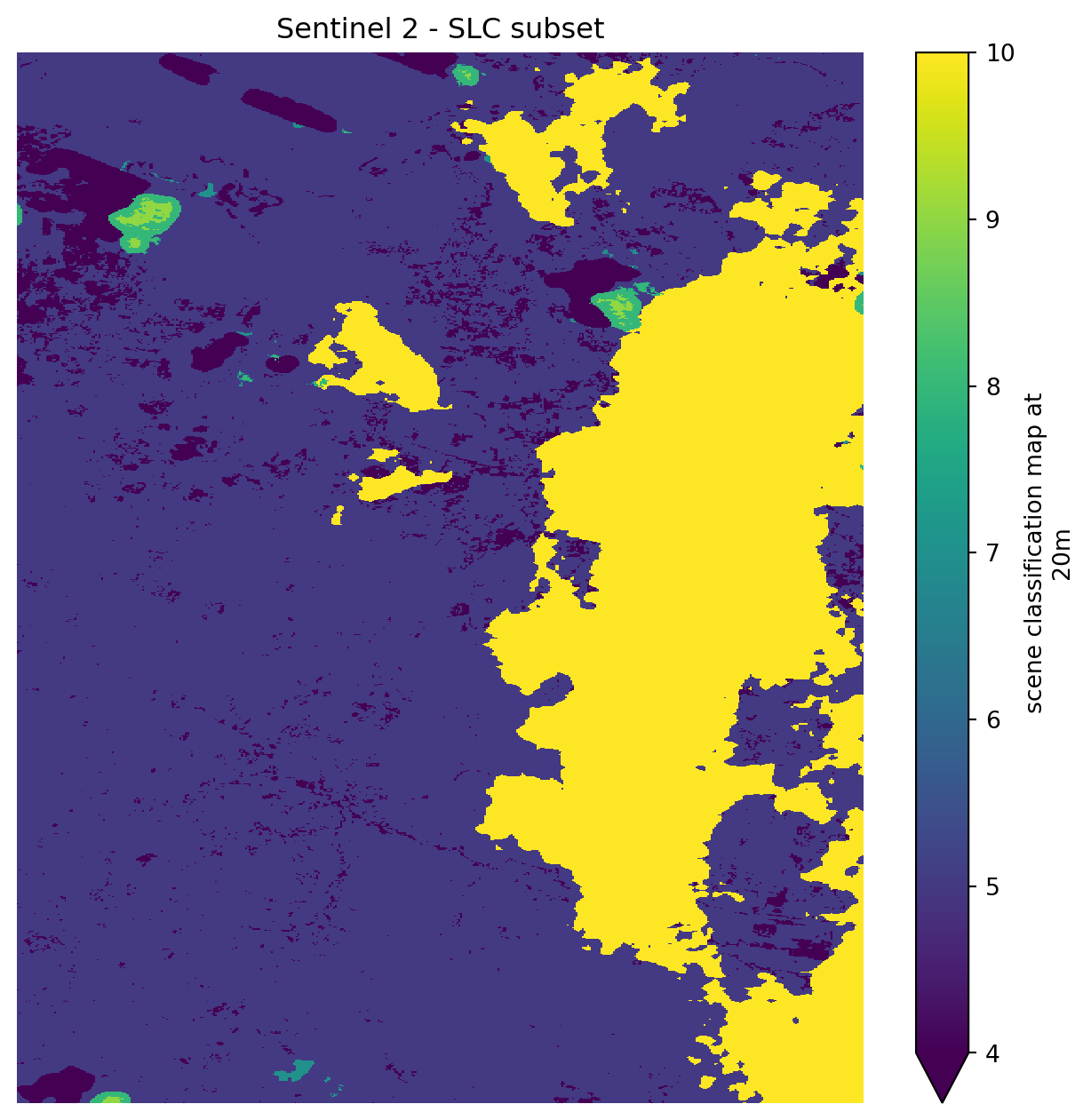
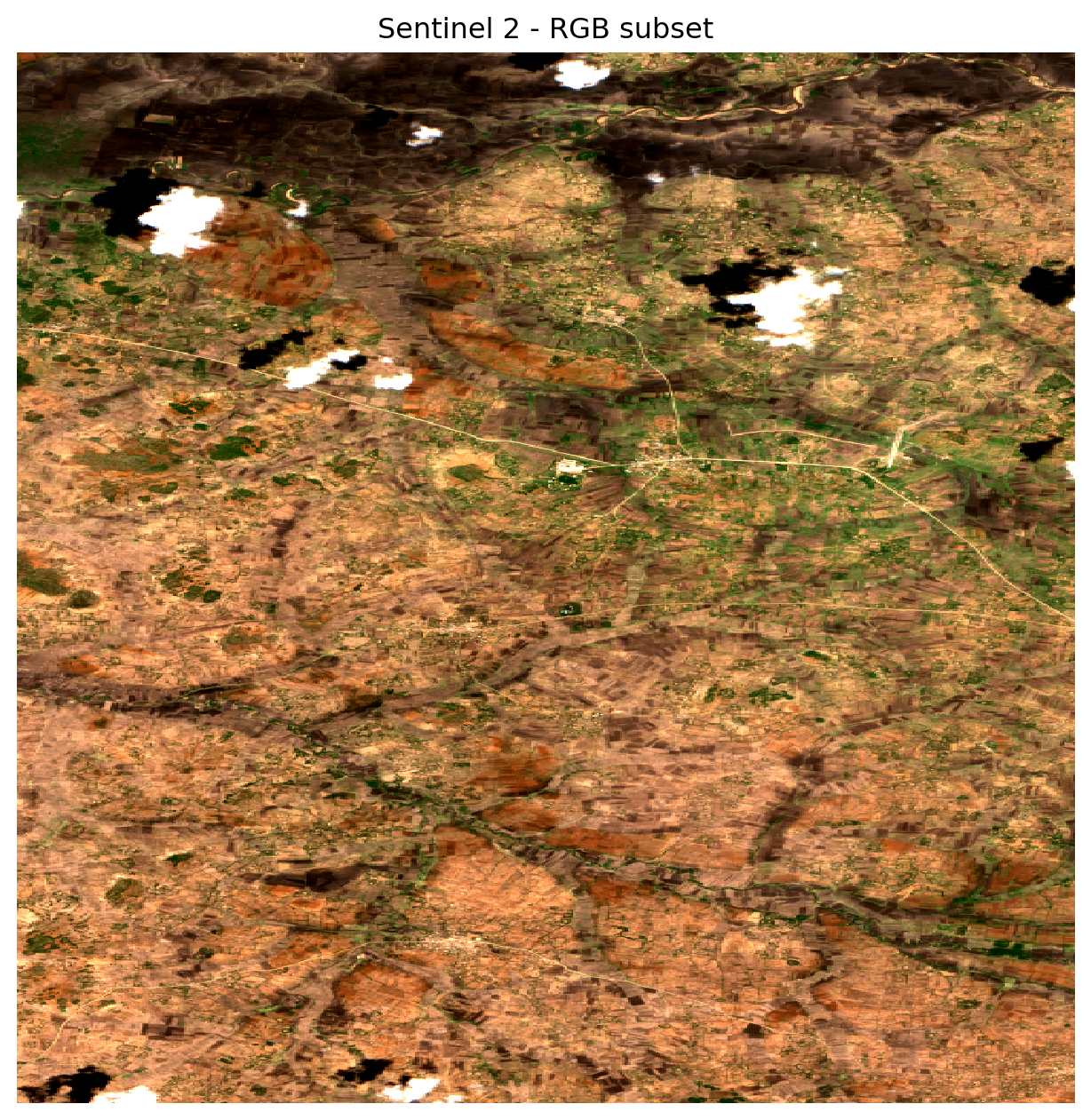
Before proceeding with any analysis on Sentinel‑2 imagery, it is important to detect and remove pixels affected by clouds, cloud shadows, because they can distort and contaminate reflectance values, thus leading to unreliable biophysical indicators and spectral analysis. Therefore, we use the Scene Classification Layer (SCL) which comes with Sentinel-2 product to detect effected pixels. SLC assigns a categorical label to each pixel describing surface type or atmospheric condition (vegetation, water, cloud, cloud shadow, etc.)

l2a_class = s2_zarr.conditions.mask.l2a_classification[f"r{resolution}m"].scl

Crop the data to a small AOI, and plot it to inspect clouds and surface classes in the scene.

slc_subset = l2a_class.sel(x=slice(xmin, xmax), y=slice(ymax, ymin))
slc_subset.plot(figsize=(8, 8), robust=True)
plt.title("Sentinel 2 - SLC subset")
plt.axis("off")
plt.show()

Afterwards, we apply the validate_scl() function, which uses the SCL band to create a boolean mask where: - True: pixel is valid - False: pixel falls into unwanted classes (no‑data, Saturated defective pixels, shadows, Unclassified, clouds)

validate_scl() takes the following keyword arguments:

  • slc: xarray.DataArray The Scene Classification (SCL) band from a Sentinel‑2 product.

Once the bands are validated we proceed with the masking. Zero is set as nodata value is needed for later steps of efast distance_to_clouds function.

valid_mask = validate_scl(scl=l2a_class)

band_data = zarr_meas.to_dataset()[s2_rgb_bands]
band_data = xr.where(valid_mask, band_data, 0)

band_data_subset = band_data.sel(x=slice(xmin, xmax), y=slice(ymax, ymin))
band_data_subset.to_array().plot.imshow(figsize=(8, 8), robust=True)
plt.title("Sentinel 2 - RGB cloud masked subset")
plt.axis("off")
plt.show()

From the visualized subset, it can be seen that the cloud affected pixels were effectively detected and removed based on the SCL information. While the SCL mask is not perfect, it provides a robust first order cloud masking that substantially improves the reliability of further spectral analyses.

EFAST Preprocessing

Now that we learned how to retrieve, explore and apply cloud masking to Sentinel‑2 L2A data, we can prepare the scenes for use with EFAST using the function s2_preprocess() which will perform the following steps for each Sentinel-2 scene:

  1. Open the data directly from the cloud-optimized .zarr archive.
  2. Select the 20 m resolution reflectance group.
  3. Extract the red (B04) and near-infrared (B8A) bands (these bands can be used to calculate Normalized Difference Vegetation Index (NDVI))
  4. Load the SCL and build a mask to remove clouds and other invalid pixels.
  5. Apply this mask to the selected bands, setting invalid pixels to zero.
  6. Save the masked bands to a local GeoTIFF file in the correct map projection.


::: {.callout-note} For details of the code, have a look in the zarr_efast_utils.py file. :::


The function s2_preprocess() takes the following arguments:

  • s2_urls: A list of input .Zarr URLs for Sentinel‑2 L2A datasets.
  • bands: A list of Sentinel‑2 spectral band names (e.g., [“b04”, “b8a”]).
  • resolution: Spatial resolution of the reflectance grid to load (10, 20, or 60 m). This selects the appropriate sub‑group inside the Zarr hierarchy (e.g., r20m).
  • output_dir: Directory where the processed GeoTIFF files will be written.
zarr_efast_utils.s2_preprocess(
    s2_urls=s2_urls, bands=s2_efast_bands, resolution=resolution, output_dir=s2_processed_dir
)
Sentinel-2 preprocessing finished.

Finally, after all scenes are prepared, we compute the distance-to-cloud layer, which is part of the EFAST Sentinel-2 processing. This parameter is used because cloud masking can often be inaccurate and the further we are from a detected cloud the more certain we can be of a valid observation.

The function distance_to_clouds() takes the following arguments:

  • dir_s2: The directory where the Sentinel-2 images are stored. Clouds and shadows should the masked using 0
  • ratio: The (rough) ratio between resolution of Sentinel-2 and Sentinel-3 images. Defaults to 30.
  • tolerance_percentage: Fraction of low-resolution (Sentinel-3) pixel which can be covered by Sentinel-2 resolution cloudy pixels before the low-resolution pixel is considered to be cloudy. Defaults to 0.05.
s2.distance_to_clouds(dir_s2=s2_processed_dir, ratio=30, tolerance_percentage=0.05)

Sentinel-3

Data search

As we did for Sentinel-2 collection, we will now retrieve the Sentinel-3 OLCI items. The collection name, bands, and AOI are once more defined to search over the sentinel-3-olci-l2-lfr collection inside the EOPF STAC Catalog.

s3_collection = "sentinel-3-olci-l2-lfr"
s3_bands = ["rc681", "rc865"]
# Search the catalog for items matching the criteria:
s3_l2 = list(
    eopf_catalog.search(
        bbox=search_bbox,
        datetime=f"{date_start}T00:00:00Z/{date_end}T23:59:59Z",
        collections=s3_collection,
        query={"product:timeliness_category": {"eq": "NT"}},
    ).item_collection()
)

# Extract the URLs for the product assets from the search results
s3_urls = [item.assets["product"].href for item in s3_l2]

print("Search Results:")
print("Total Items Found for Sentinel-3 OLCI over Serengeti:  ", len(s3_urls))
Search Results:
Total Items Found for Sentinel-3 OLCI over Serengeti:   0


::: {.callout-note} As the EOPF STAC Catalog provides sample data, some scenes are not directly available through the Catalogs search. The required Sentinel-3 items are provided here directly as URLs. :::

# Temporary, until STAC catalogue is fixed
s3_urls = ['https://objects.eodc.eu:443/e05ab01a9d56408d82ac32d69a5aae2a:notebook-data/tutorial_data/cpm_v262/S3A_OL_2_LFR____20241101T071724_20241101T072024_20250805T204152_0179_118_334_3060_ESA_R_NT_003.zarr', 'https://objects.eodc.eu:443/e05ab01a9d56408d82ac32d69a5aae2a:notebook-data/tutorial_data/cpm_v262/S3A_OL_2_LFR____20241104T073951_20241104T074251_20250805T234912_0179_118_377_3060_ESA_R_NT_003.zarr', 'https://objects.eodc.eu:443/e05ab01a9d56408d82ac32d69a5aae2a:notebook-data/tutorial_data/cpm_v262/S3A_OL_2_LFR____20241218T065836_20241218T070136_20241219T073531_0179_120_234_3060_PS1_O_NT_003.zarr', 'https://objects.eodc.eu:443/e05ab01a9d56408d82ac32d69a5aae2a:notebook-data/tutorial_data/cpm_v262/S3B_OL_2_LFR____20241201T070106_20241201T070406_20241201T203734_0179_100_234_3060_PS2_O_NT_002.zarr', 'https://objects.eodc.eu:443/e05ab01a9d56408d82ac32d69a5aae2a:notebook-data/tutorial_data/cpm_v262/S3B_OL_2_LFR____20241219T073443_20241219T073743_20241219T221414_0179_101_106_3060_PS2_O_NT_003.zarr', 'https://objects.eodc.eu:443/e05ab01a9d56408d82ac32d69a5aae2a:notebook-data/tutorial_data/cpm_v262/S3B_OL_2_LFR____20241111T071646_20241111T071946_20241111T222052_0179_099_334_2880_PS2_O_NT_002.zarr', 'https://objects.eodc.eu:443/e05ab01a9d56408d82ac32d69a5aae2a:notebook-data/tutorial_data/cpm_v262/S3A_OL_2_LFR____20241201T073948_20241201T074248_20241202T081044_0179_119_377_3060_PS1_O_NT_002.zarr', 'https://objects.eodc.eu:443/e05ab01a9d56408d82ac32d69a5aae2a:notebook-data/tutorial_data/cpm_v262/S3A_OL_2_LFR____20241201T073648_20241201T073948_20241202T081046_0179_119_377_2880_PS1_O_NT_002.zarr', 'https://objects.eodc.eu:443/e05ab01a9d56408d82ac32d69a5aae2a:notebook-data/tutorial_data/cpm_v262/S3A_OL_2_LFR____20241213T072532_20241213T072832_20241214T081519_0179_120_163_2880_PS1_O_NT_002.zarr', 'https://objects.eodc.eu:443/e05ab01a9d56408d82ac32d69a5aae2a:notebook-data/tutorial_data/cpm_v262/S3A_OL_2_LFR____20241220T074714_20241220T075014_20241221T081623_0179_120_263_3060_PS1_O_NT_003.zarr', 'https://objects.eodc.eu:443/e05ab01a9d56408d82ac32d69a5aae2a:notebook-data/tutorial_data/cpm_v262/S3B_OL_2_LFR____20241203T074942_20241203T075242_20241203T223738_0179_100_263_3060_PS2_O_NT_002.zarr', 'https://objects.eodc.eu:443/e05ab01a9d56408d82ac32d69a5aae2a:notebook-data/tutorial_data/cpm_v262/S3A_OL_2_LFR____20241216T074758_20241216T075058_20241217T081943_0179_120_206_2880_PS1_O_NT_002.zarr', 'https://objects.eodc.eu:443/e05ab01a9d56408d82ac32d69a5aae2a:notebook-data/tutorial_data/cpm_v262/S3A_OL_2_LFR____20241101T071424_20241101T071724_20250805T204149_0179_118_334_2880_ESA_R_NT_003.zarr', 'https://objects.eodc.eu:443/e05ab01a9d56408d82ac32d69a5aae2a:notebook-data/tutorial_data/cpm_v262/S3A_OL_2_LFR____20241104T073651_20241104T073951_20250805T234733_0179_118_377_2880_ESA_R_NT_003.zarr', 'https://objects.eodc.eu:443/e05ab01a9d56408d82ac32d69a5aae2a:notebook-data/tutorial_data/cpm_v262/S3B_OL_2_LFR____20241127T070451_20241127T070751_20241127T220949_0179_100_177_3060_PS2_O_NT_002.zarr', 'https://objects.eodc.eu:443/e05ab01a9d56408d82ac32d69a5aae2a:notebook-data/tutorial_data/cpm_v262/S3A_OL_2_LFR____20241123T074717_20241123T075017_20241124T083043_0179_119_263_3060_PS1_O_NT_002.zarr', 'https://objects.eodc.eu:443/e05ab01a9d56408d82ac32d69a5aae2a:notebook-data/tutorial_data/cpm_v262/S3B_OL_2_LFR____20241219T073143_20241219T073443_20241219T221408_0179_101_106_2880_PS2_O_NT_003.zarr', 'https://objects.eodc.eu:443/e05ab01a9d56408d82ac32d69a5aae2a:notebook-data/tutorial_data/cpm_v262/S3A_OL_2_LFR____20241213T072832_20241213T073132_20241214T081534_0179_120_163_3060_PS1_O_NT_002.zarr', 'https://objects.eodc.eu:443/e05ab01a9d56408d82ac32d69a5aae2a:notebook-data/tutorial_data/cpm_v262/S3A_OL_2_LFR____20241202T071337_20241202T071637_20241203T074421_0180_120_006_3060_PS1_O_NT_002.zarr', 'https://objects.eodc.eu:443/e05ab01a9d56408d82ac32d69a5aae2a:notebook-data/tutorial_data/cpm_v262/S3A_OL_2_LFR____20241210T070606_20241210T070906_20241211T073745_0179_120_120_3060_PS1_O_NT_002.zarr', 'https://objects.eodc.eu:443/e05ab01a9d56408d82ac32d69a5aae2a:notebook-data/tutorial_data/cpm_v262/S3B_OL_2_LFR____20241203T074642_20241203T074942_20241203T223732_0179_100_263_2880_PS2_O_NT_002.zarr', 'https://objects.eodc.eu:443/e05ab01a9d56408d82ac32d69a5aae2a:notebook-data/tutorial_data/cpm_v262/S3A_OL_2_LFR____20241111T075530_20241111T075830_20241112T083049_0179_119_092_2880_PS1_O_NT_002.zarr', 'https://objects.eodc.eu:443/e05ab01a9d56408d82ac32d69a5aae2a:notebook-data/tutorial_data/cpm_v262/S3B_OL_2_LFR____20241204T072031_20241204T072331_20241204T220357_0179_100_277_2880_PS2_O_NT_002.zarr', 'https://objects.eodc.eu:443/e05ab01a9d56408d82ac32d69a5aae2a:notebook-data/tutorial_data/cpm_v262/S3A_OL_2_LFR____20241229T071337_20241229T071637_20241230T074406_0179_121_006_3060_PS1_O_NT_003.zarr', 'https://objects.eodc.eu:443/e05ab01a9d56408d82ac32d69a5aae2a:notebook-data/tutorial_data/cpm_v262/S3A_OL_2_LFR____20241214T070221_20241214T070521_20241215T073651_0179_120_177_3060_PS1_O_NT_002.zarr', 'https://objects.eodc.eu:443/e05ab01a9d56408d82ac32d69a5aae2a:notebook-data/tutorial_data/cpm_v262/S3A_OL_2_LFR____20241205T073303_20241205T073603_20241206T081002_0179_120_049_2880_PS1_O_NT_002.zarr', 'https://objects.eodc.eu:443/e05ab01a9d56408d82ac32d69a5aae2a:notebook-data/tutorial_data/cpm_v262/S3B_OL_2_LFR____20241212T071302_20241212T071602_20241212T220350_0180_101_006_2880_PS2_O_NT_002.zarr', 'https://objects.eodc.eu:443/e05ab01a9d56408d82ac32d69a5aae2a:notebook-data/tutorial_data/cpm_v262/S3B_OL_2_LFR____20241224T070449_20241224T070749_20241224T220506_0179_101_177_3060_PS2_O_NT_003.zarr', 'https://objects.eodc.eu:443/e05ab01a9d56408d82ac32d69a5aae2a:notebook-data/tutorial_data/cpm_v262/S3B_OL_2_LFR____20241103T072416_20241103T072716_20241103T221756_0179_099_220_2880_PS2_O_NT_002.zarr', 'https://objects.eodc.eu:443/e05ab01a9d56408d82ac32d69a5aae2a:notebook-data/tutorial_data/cpm_v262/S3A_OL_2_LFR____20241128T071421_20241128T071721_20241129T074602_0179_119_334_2880_PS1_O_NT_002.zarr', 'https://objects.eodc.eu:443/e05ab01a9d56408d82ac32d69a5aae2a:notebook-data/tutorial_data/cpm_v262/S3B_OL_2_LFR____20241228T070104_20241228T070404_20241228T211722_0179_101_234_3060_PS2_O_NT_003.zarr', 'https://objects.eodc.eu:443/e05ab01a9d56408d82ac32d69a5aae2a:notebook-data/tutorial_data/cpm_v262/S3A_OL_2_LFR____20241216T075058_20241216T075358_20241217T081946_0179_120_206_3060_PS1_O_NT_002.zarr', 'https://objects.eodc.eu:443/e05ab01a9d56408d82ac32d69a5aae2a:notebook-data/tutorial_data/cpm_v262/S3A_OL_2_LFR____20241111T075830_20241111T080130_20241112T083049_0179_119_092_3060_PS1_O_NT_002.zarr', 'https://objects.eodc.eu:443/e05ab01a9d56408d82ac32d69a5aae2a:notebook-data/tutorial_data/cpm_v262/S3B_OL_2_LFR____20241204T072331_20241204T072631_20241204T220403_0179_100_277_3060_PS2_O_NT_002.zarr', 'https://objects.eodc.eu:443/e05ab01a9d56408d82ac32d69a5aae2a:notebook-data/tutorial_data/cpm_v262/S3B_OL_2_LFR____20241211T074213_20241211T074513_20241211T220921_0179_100_377_3060_PS2_O_NT_002.zarr', 'https://objects.eodc.eu:443/e05ab01a9d56408d82ac32d69a5aae2a:notebook-data/tutorial_data/cpm_v262/S3A_OL_2_LFR____20241205T073603_20241205T073903_20241206T081002_0179_120_049_3060_PS1_O_NT_002.zarr', 'https://objects.eodc.eu:443/e05ab01a9d56408d82ac32d69a5aae2a:notebook-data/tutorial_data/cpm_v262/S3A_OL_2_LFR____20241206T070952_20241206T071252_20241207T074238_0179_120_063_3060_PS1_O_NT_002.zarr', 'https://objects.eodc.eu:443/e05ab01a9d56408d82ac32d69a5aae2a:notebook-data/tutorial_data/cpm_v262/S3B_OL_2_LFR____20241211T073913_20241211T074213_20241211T220916_0179_100_377_2880_PS2_O_NT_002.zarr', 'https://objects.eodc.eu:443/e05ab01a9d56408d82ac32d69a5aae2a:notebook-data/tutorial_data/cpm_v262/S3A_OL_2_LFR____20241128T071721_20241128T072021_20241129T074602_0180_119_334_3060_PS1_O_NT_002.zarr', 'https://objects.eodc.eu:443/e05ab01a9d56408d82ac32d69a5aae2a:notebook-data/tutorial_data/cpm_v262/S3B_OL_2_LFR____20241207T074258_20241207T074558_20241207T215909_0179_100_320_2880_PS2_O_NT_002.zarr', 'https://objects.eodc.eu:443/e05ab01a9d56408d82ac32d69a5aae2a:notebook-data/tutorial_data/cpm_v262/S3B_OL_2_LFR____20241122T073446_20241122T073746_20241122T220827_0179_100_106_3060_PS2_O_NT_002.zarr', 'https://objects.eodc.eu:443/e05ab01a9d56408d82ac32d69a5aae2a:notebook-data/tutorial_data/cpm_v262/S3A_OL_2_LFR____20241127T074332_20241127T074632_20241128T081434_0180_119_320_3060_PS1_O_NT_002.zarr', 'https://objects.eodc.eu:443/e05ab01a9d56408d82ac32d69a5aae2a:notebook-data/tutorial_data/cpm_v262/S3B_OL_2_LFR____20241114T074212_20241114T074512_20241114T221534_0179_099_377_3060_PS2_O_NT_002.zarr', 'https://objects.eodc.eu:443/e05ab01a9d56408d82ac32d69a5aae2a:notebook-data/tutorial_data/cpm_v262/S3B_OL_2_LFR____20241207T074558_20241207T074858_20241207T215915_0179_100_320_3060_PS2_O_NT_002.zarr', 'https://objects.eodc.eu:443/e05ab01a9d56408d82ac32d69a5aae2a:notebook-data/tutorial_data/cpm_v262/S3A_OL_2_LFR____20241112T072919_20241112T073219_20241113T081748_0179_119_106_2880_PS1_O_NT_002.zarr', 'https://objects.eodc.eu:443/e05ab01a9d56408d82ac32d69a5aae2a:notebook-data/tutorial_data/cpm_v262/S3A_OL_2_LFR____20241112T073219_20241112T073519_20241113T081749_0179_119_106_3060_PS1_O_NT_002.zarr', 'https://objects.eodc.eu:443/e05ab01a9d56408d82ac32d69a5aae2a:notebook-data/tutorial_data/cpm_v262/S3B_OL_2_LFR____20241208T071647_20241208T071947_20241208T215638_0179_100_334_2880_PS2_O_NT_002.zarr', 'https://objects.eodc.eu:443/e05ab01a9d56408d82ac32d69a5aae2a:notebook-data/tutorial_data/cpm_v262/S3B_OL_2_LFR____20241208T071947_20241208T072247_20241208T215643_0179_100_334_3060_PS2_O_NT_002.zarr', 'https://objects.eodc.eu:443/e05ab01a9d56408d82ac32d69a5aae2a:notebook-data/tutorial_data/cpm_v262/S3A_OL_2_LFR____20241127T074032_20241127T074332_20241128T081433_0179_119_320_2880_PS1_O_NT_002.zarr', 'https://objects.eodc.eu:443/e05ab01a9d56408d82ac32d69a5aae2a:notebook-data/tutorial_data/cpm_v262/S3A_OL_2_LFR____20241124T071806_20241124T072106_20241125T075255_0179_119_277_2880_PS1_O_NT_002.zarr', 'https://objects.eodc.eu:443/e05ab01a9d56408d82ac32d69a5aae2a:notebook-data/tutorial_data/cpm_v262/S3A_OL_2_LFR____20241113T070609_20241113T070909_20241114T074818_0179_119_120_3060_PS1_O_NT_002.zarr', 'https://objects.eodc.eu:443/e05ab01a9d56408d82ac32d69a5aae2a:notebook-data/tutorial_data/cpm_v262/S3B_OL_2_LFR____20241114T073912_20241114T074212_20241114T221528_0179_099_377_2880_PS2_O_NT_002.zarr', 'https://objects.eodc.eu:443/e05ab01a9d56408d82ac32d69a5aae2a:notebook-data/tutorial_data/cpm_v262/S3B_OL_2_LFR____20241126T073102_20241126T073402_20241126T222646_0179_100_163_3060_PS2_O_NT_002.zarr', 'https://objects.eodc.eu:443/e05ab01a9d56408d82ac32d69a5aae2a:notebook-data/tutorial_data/cpm_v262/S3B_OL_2_LFR____20241125T075413_20241125T075713_20241125T203834_0179_100_149_2880_PS2_O_NT_002.zarr', 'https://objects.eodc.eu:443/e05ab01a9d56408d82ac32d69a5aae2a:notebook-data/tutorial_data/cpm_v262/S3A_OL_2_LFR____20241115T075446_20241115T075746_20241116T082753_0179_119_149_3060_PS1_O_NT_002.zarr', 'https://objects.eodc.eu:443/e05ab01a9d56408d82ac32d69a5aae2a:notebook-data/tutorial_data/cpm_v262/S3A_OL_2_LFR____20241115T075146_20241115T075446_20241116T082746_0179_119_149_2880_PS1_O_NT_002.zarr', 'https://objects.eodc.eu:443/e05ab01a9d56408d82ac32d69a5aae2a:notebook-data/tutorial_data/cpm_v262/S3A_OL_2_LFR____20241224T074031_20241224T074331_20241225T081404_0179_120_320_2880_PS1_O_NT_003.zarr', 'https://objects.eodc.eu:443/e05ab01a9d56408d82ac32d69a5aae2a:notebook-data/tutorial_data/cpm_v262/S3A_OL_2_LFR____20241108T073605_20241108T073905_20241109T080650_0179_119_049_3060_PS1_O_NT_002.zarr', 'https://objects.eodc.eu:443/e05ab01a9d56408d82ac32d69a5aae2a:notebook-data/tutorial_data/cpm_v262/S3B_OL_2_LFR____20241126T072802_20241126T073102_20241126T222640_0179_100_163_2880_PS2_O_NT_002.zarr', 'https://objects.eodc.eu:443/e05ab01a9d56408d82ac32d69a5aae2a:notebook-data/tutorial_data/cpm_v262/S3B_OL_2_LFR____20241125T075713_20241125T080013_20241125T203839_0179_100_149_3060_PS2_O_NT_002.zarr', 'https://objects.eodc.eu:443/e05ab01a9d56408d82ac32d69a5aae2a:notebook-data/tutorial_data/cpm_v262/S3B_OL_2_LFR____20241115T071602_20241115T071902_20241115T203917_0179_100_006_3060_PS2_O_NT_002.zarr', 'https://objects.eodc.eu:443/e05ab01a9d56408d82ac32d69a5aae2a:notebook-data/tutorial_data/cpm_v262/S3B_OL_2_LFR____20241115T071302_20241115T071602_20241115T203911_0179_100_006_2880_PS2_O_NT_002.zarr', 'https://objects.eodc.eu:443/e05ab01a9d56408d82ac32d69a5aae2a:notebook-data/tutorial_data/cpm_v262/S3A_OL_2_LFR____20241228T073648_20241228T073948_20241229T081109_0180_120_377_2880_PS1_O_NT_003.zarr', 'https://objects.eodc.eu:443/e05ab01a9d56408d82ac32d69a5aae2a:notebook-data/tutorial_data/cpm_v262/S3B_OL_2_LFR____20241123T070836_20241123T071136_20241123T221120_0179_100_120_3060_PS2_O_NT_002.zarr', 'https://objects.eodc.eu:443/e05ab01a9d56408d82ac32d69a5aae2a:notebook-data/tutorial_data/cpm_v262/S3A_OL_2_LFR____20241208T075829_20241208T080129_20241209T082958_0180_120_092_3060_PS1_O_NT_002.zarr', 'https://objects.eodc.eu:443/e05ab01a9d56408d82ac32d69a5aae2a:notebook-data/tutorial_data/cpm_v262/S3A_OL_2_LFR____20241208T075529_20241208T075829_20241209T082959_0179_120_092_2880_PS1_O_NT_002.zarr', 'https://objects.eodc.eu:443/e05ab01a9d56408d82ac32d69a5aae2a:notebook-data/tutorial_data/cpm_v262/S3B_OL_2_LFR____20241227T072715_20241227T073015_20241227T212122_0179_101_220_3060_PS2_O_NT_003.zarr', 'https://objects.eodc.eu:443/e05ab01a9d56408d82ac32d69a5aae2a:notebook-data/tutorial_data/cpm_v262/S3A_OL_2_LFR____20241116T072536_20241116T072836_20241117T080953_0179_119_163_2880_PS1_O_NT_002.zarr', 'https://objects.eodc.eu:443/e05ab01a9d56408d82ac32d69a5aae2a:notebook-data/tutorial_data/cpm_v262/S3B_OL_2_LFR____20241231T072330_20241231T072630_20241231T221210_0179_101_277_3060_PS2_O_NT_003.zarr', 'https://objects.eodc.eu:443/e05ab01a9d56408d82ac32d69a5aae2a:notebook-data/tutorial_data/cpm_v262/S3A_OL_2_LFR____20241117T070225_20241117T070525_20241118T073156_0179_119_177_3060_PS1_O_NT_002.zarr', 'https://objects.eodc.eu:443/e05ab01a9d56408d82ac32d69a5aae2a:notebook-data/tutorial_data/cpm_v262/S3B_OL_2_LFR____20241119T071219_20241119T071519_20241119T211728_0179_100_063_3060_PS2_O_NT_002.zarr', 'https://objects.eodc.eu:443/e05ab01a9d56408d82ac32d69a5aae2a:notebook-data/tutorial_data/cpm_v262/S3A_OL_2_LFR____20241224T074331_20241224T074631_20241225T081405_0179_120_320_3060_PS1_O_NT_003.zarr', 'https://objects.eodc.eu:443/e05ab01a9d56408d82ac32d69a5aae2a:notebook-data/tutorial_data/cpm_v262/S3B_OL_2_LFR____20241227T072415_20241227T072715_20241227T212116_0179_101_220_2880_PS2_O_NT_003.zarr', 'https://objects.eodc.eu:443/e05ab01a9d56408d82ac32d69a5aae2a:notebook-data/tutorial_data/cpm_v262/S3A_OL_2_LFR____20241119T074802_20241119T075102_20241120T083445_0179_119_206_2880_PS1_O_NT_002.zarr', 'https://objects.eodc.eu:443/e05ab01a9d56408d82ac32d69a5aae2a:notebook-data/tutorial_data/cpm_v262/S3A_OL_2_LFR____20241104T073951_20241104T074251_20241105T081341_0179_118_377_3060_PS1_O_NT_002.zarr', 'https://objects.eodc.eu:443/e05ab01a9d56408d82ac32d69a5aae2a:notebook-data/tutorial_data/cpm_v262/S3A_OL_2_LFR____20241104T073651_20241104T073951_20241105T081341_0179_118_377_2880_PS1_O_NT_002.zarr', 'https://objects.eodc.eu:443/e05ab01a9d56408d82ac32d69a5aae2a:notebook-data/tutorial_data/cpm_v262/S3A_OL_2_LFR____20241212T075143_20241212T075443_20241213T082646_0180_120_149_2880_PS1_O_NT_002.zarr', 'https://objects.eodc.eu:443/e05ab01a9d56408d82ac32d69a5aae2a:notebook-data/tutorial_data/cpm_v262/S3A_OL_2_LFR____20241108T073305_20241108T073605_20241109T080655_0179_119_049_2880_PS1_O_NT_002.zarr', 'https://objects.eodc.eu:443/e05ab01a9d56408d82ac32d69a5aae2a:notebook-data/tutorial_data/cpm_v262/S3A_OL_2_LFR____20241116T072836_20241116T073136_20241117T081013_0179_119_163_3060_PS1_O_NT_002.zarr', 'https://objects.eodc.eu:443/e05ab01a9d56408d82ac32d69a5aae2a:notebook-data/tutorial_data/cpm_v262/S3B_OL_2_LFR____20241231T072030_20241231T072330_20241231T221205_0179_101_277_2880_PS2_O_NT_003.zarr', 'https://objects.eodc.eu:443/e05ab01a9d56408d82ac32d69a5aae2a:notebook-data/tutorial_data/cpm_v262/S3B_OL_2_LFR____20241118T073530_20241118T073830_20241118T224144_0179_100_049_2880_PS2_O_NT_002.zarr', 'https://objects.eodc.eu:443/e05ab01a9d56408d82ac32d69a5aae2a:notebook-data/tutorial_data/cpm_v262/S3B_OL_2_LFR____20241118T073830_20241118T074130_20241118T224149_0179_100_049_3060_PS2_O_NT_002.zarr', 'https://objects.eodc.eu:443/e05ab01a9d56408d82ac32d69a5aae2a:notebook-data/tutorial_data/cpm_v262/S3B_OL_2_LFR____20241129T075028_20241129T075328_20241129T211722_0179_100_206_2880_PS2_O_NT_002.zarr', 'https://objects.eodc.eu:443/e05ab01a9d56408d82ac32d69a5aae2a:notebook-data/tutorial_data/cpm_v262/S3B_OL_2_LFR____20241122T073146_20241122T073446_20241122T220822_0179_100_106_2880_PS2_O_NT_002.zarr', 'https://objects.eodc.eu:443/e05ab01a9d56408d82ac32d69a5aae2a:notebook-data/tutorial_data/cpm_v262/S3B_OL_2_LFR____20241104T070105_20241104T070405_20241104T221519_0179_099_234_3060_PS2_O_NT_002.zarr', 'https://objects.eodc.eu:443/e05ab01a9d56408d82ac32d69a5aae2a:notebook-data/tutorial_data/cpm_v262/S3A_OL_2_LFR____20241212T075443_20241212T075743_20241213T082657_0179_120_149_3060_PS1_O_NT_002.zarr', 'https://objects.eodc.eu:443/e05ab01a9d56408d82ac32d69a5aae2a:notebook-data/tutorial_data/cpm_v262/S3A_OL_2_LFR____20241105T071340_20241105T071640_20241106T075704_0179_119_006_3060_PS1_O_NT_002.zarr', 'https://objects.eodc.eu:443/e05ab01a9d56408d82ac32d69a5aae2a:notebook-data/tutorial_data/cpm_v262/S3B_OL_2_LFR____20241106T074943_20241106T075243_20241106T211630_0179_099_263_3060_PS2_O_NT_002.zarr', 'https://objects.eodc.eu:443/e05ab01a9d56408d82ac32d69a5aae2a:notebook-data/tutorial_data/cpm_v262/S3A_OL_2_LFR____20241217T072447_20241217T072747_20241218T075502_0179_120_220_3060_PS1_O_NT_003.zarr', 'https://objects.eodc.eu:443/e05ab01a9d56408d82ac32d69a5aae2a:notebook-data/tutorial_data/cpm_v262/S3B_OL_2_LFR____20241102T075026_20241102T075326_20241102T211206_0180_099_206_2880_PS2_O_NT_002.zarr', 'https://objects.eodc.eu:443/e05ab01a9d56408d82ac32d69a5aae2a:notebook-data/tutorial_data/cpm_v262/S3A_OL_2_LFR____20241121T065840_20241121T070140_20241122T072648_0179_119_234_3060_PS1_O_NT_002.zarr', 'https://objects.eodc.eu:443/e05ab01a9d56408d82ac32d69a5aae2a:notebook-data/tutorial_data/cpm_v262/S3B_OL_2_LFR____20241106T074643_20241106T074943_20241106T211624_0179_099_263_2880_PS2_O_NT_002.zarr', 'https://objects.eodc.eu:443/e05ab01a9d56408d82ac32d69a5aae2a:notebook-data/tutorial_data/cpm_v262/S3A_OL_2_LFR____20241119T075102_20241119T075402_20241120T083444_0179_119_206_3060_PS1_O_NT_002.zarr', 'https://objects.eodc.eu:443/e05ab01a9d56408d82ac32d69a5aae2a:notebook-data/tutorial_data/cpm_v262/S3A_OL_2_LFR____20241123T074417_20241123T074717_20241124T083019_0179_119_263_2880_PS1_O_NT_002.zarr', 'https://objects.eodc.eu:443/e05ab01a9d56408d82ac32d69a5aae2a:notebook-data/tutorial_data/cpm_v262/S3A_OL_2_LFR____20241217T072147_20241217T072447_20241218T075511_0179_120_220_2880_PS1_O_NT_003.zarr', 'https://objects.eodc.eu:443/e05ab01a9d56408d82ac32d69a5aae2a:notebook-data/tutorial_data/cpm_v262/S3A_OL_2_LFR____20241101T071724_20241101T072024_20241102T074727_0179_118_334_3060_PS1_O_NT_002.zarr', 'https://objects.eodc.eu:443/e05ab01a9d56408d82ac32d69a5aae2a:notebook-data/tutorial_data/cpm_v262/S3A_OL_2_LFR____20241101T071424_20241101T071724_20241102T074730_0179_118_334_2880_PS1_O_NT_002.zarr', 'https://objects.eodc.eu:443/e05ab01a9d56408d82ac32d69a5aae2a:notebook-data/tutorial_data/cpm_v262/S3B_OL_2_LFR____20241102T075326_20241102T075626_20241102T211211_0179_099_206_3060_PS2_O_NT_002.zarr', 'https://objects.eodc.eu:443/e05ab01a9d56408d82ac32d69a5aae2a:notebook-data/tutorial_data/cpm_v262/S3B_OL_2_LFR____20241103T072716_20241103T073016_20241103T221802_0179_099_220_3060_PS2_O_NT_002.zarr', 'https://objects.eodc.eu:443/e05ab01a9d56408d82ac32d69a5aae2a:notebook-data/tutorial_data/cpm_v262/S3B_OL_2_LFR____20241107T072032_20241107T072332_20241107T204607_0179_099_277_2880_PS2_O_NT_002.zarr', 'https://objects.eodc.eu:443/e05ab01a9d56408d82ac32d69a5aae2a:notebook-data/tutorial_data/cpm_v262/S3B_OL_2_LFR____20241107T072332_20241107T072632_20241107T204613_0179_099_277_3060_PS2_O_NT_002.zarr', 'https://objects.eodc.eu:443/e05ab01a9d56408d82ac32d69a5aae2a:notebook-data/tutorial_data/cpm_v262/S3A_OL_2_LFR____20241209T073218_20241209T073518_20241210T080704_0179_120_106_3060_PS1_O_NT_002.zarr', 'https://objects.eodc.eu:443/e05ab01a9d56408d82ac32d69a5aae2a:notebook-data/tutorial_data/cpm_v262/S3A_OL_2_LFR____20241109T070954_20241109T071254_20241110T074326_0179_119_063_3060_PS1_O_NT_002.zarr', 'https://objects.eodc.eu:443/e05ab01a9d56408d82ac32d69a5aae2a:notebook-data/tutorial_data/cpm_v262/S3B_OL_2_LFR____20241110T074257_20241110T074557_20241110T220753_0180_099_320_2880_PS2_O_NT_002.zarr', 'https://objects.eodc.eu:443/e05ab01a9d56408d82ac32d69a5aae2a:notebook-data/tutorial_data/cpm_v262/S3B_OL_2_LFR____20241110T074557_20241110T074857_20241110T220758_0179_099_320_3060_PS2_O_NT_002.zarr', 'https://objects.eodc.eu:443/e05ab01a9d56408d82ac32d69a5aae2a:notebook-data/tutorial_data/cpm_v262/S3A_OL_2_LFR____20241120T072151_20241120T072451_20241121T075845_0179_119_220_2880_PS1_O_NT_002.zarr', 'https://objects.eodc.eu:443/e05ab01a9d56408d82ac32d69a5aae2a:notebook-data/tutorial_data/cpm_v262/S3A_OL_2_LFR____20241120T072451_20241120T072751_20241121T075848_0179_119_220_3060_PS1_O_NT_002.zarr', 'https://objects.eodc.eu:443/e05ab01a9d56408d82ac32d69a5aae2a:notebook-data/tutorial_data/cpm_v262/S3A_OL_2_LFR____20241209T072918_20241209T073218_20241210T080702_0179_120_106_2880_PS1_O_NT_002.zarr', 'https://objects.eodc.eu:443/e05ab01a9d56408d82ac32d69a5aae2a:notebook-data/tutorial_data/cpm_v262/S3B_OL_2_LFR____20241111T071946_20241111T072246_20241111T222058_0180_099_334_3060_PS2_O_NT_002.zarr', 'https://objects.eodc.eu:443/e05ab01a9d56408d82ac32d69a5aae2a:notebook-data/tutorial_data/cpm_v262/S3B_OL_2_LFR____20241129T075328_20241129T075628_20241129T211733_0180_100_206_3060_PS2_O_NT_002.zarr', 'https://objects.eodc.eu:443/e05ab01a9d56408d82ac32d69a5aae2a:notebook-data/tutorial_data/cpm_v262/S3B_OL_2_LFR____20241130T072417_20241130T072717_20241130T220448_0179_100_220_2880_PS2_O_NT_002.zarr', 'https://objects.eodc.eu:443/e05ab01a9d56408d82ac32d69a5aae2a:notebook-data/tutorial_data/cpm_v262/S3B_OL_2_LFR____20241215T073528_20241215T073828_20241215T213059_0179_101_049_2880_PS2_O_NT_002.zarr', 'https://objects.eodc.eu:443/e05ab01a9d56408d82ac32d69a5aae2a:notebook-data/tutorial_data/cpm_v262/S3B_OL_2_LFR____20241216T071217_20241216T071517_20241216T220346_0179_101_063_3060_PS2_O_NT_002.zarr', 'https://objects.eodc.eu:443/e05ab01a9d56408d82ac32d69a5aae2a:notebook-data/tutorial_data/cpm_v262/S3A_OL_2_LFR____20241225T071721_20241225T072021_20241226T074943_0179_120_334_3060_PS1_O_NT_003.zarr', 'https://objects.eodc.eu:443/e05ab01a9d56408d82ac32d69a5aae2a:notebook-data/tutorial_data/cpm_v262/S3B_OL_2_LFR____20241230T074641_20241230T074941_20241230T215402_0179_101_263_2880_PS2_O_NT_003.zarr', 'https://objects.eodc.eu:443/e05ab01a9d56408d82ac32d69a5aae2a:notebook-data/tutorial_data/cpm_v262/S3A_OL_2_LFR____20241221T072104_20241221T072404_20241222T075414_0180_120_277_3060_PS1_O_NT_003.zarr', 'https://objects.eodc.eu:443/e05ab01a9d56408d82ac32d69a5aae2a:notebook-data/tutorial_data/cpm_v262/S3A_OL_2_LFR____20241124T072106_20241124T072406_20241125T075257_0179_119_277_3060_PS1_O_NT_002.zarr', 'https://objects.eodc.eu:443/e05ab01a9d56408d82ac32d69a5aae2a:notebook-data/tutorial_data/cpm_v262/S3B_OL_2_LFR____20241130T072717_20241130T073017_20241130T220453_0179_100_220_3060_PS2_O_NT_002.zarr', 'https://objects.eodc.eu:443/e05ab01a9d56408d82ac32d69a5aae2a:notebook-data/tutorial_data/cpm_v262/S3B_OL_2_LFR____20241212T071602_20241212T071902_20241212T220355_0179_101_006_3060_PS2_O_NT_002.zarr', 'https://objects.eodc.eu:443/e05ab01a9d56408d82ac32d69a5aae2a:notebook-data/tutorial_data/cpm_v262/S3B_OL_2_LFR____20241215T073828_20241215T074128_20241215T213105_0179_101_049_3060_PS2_O_NT_002.zarr', 'https://objects.eodc.eu:443/e05ab01a9d56408d82ac32d69a5aae2a:notebook-data/tutorial_data/cpm_v262/S3B_OL_2_LFR____20241230T074941_20241230T075241_20241230T215407_0179_101_263_3060_PS2_O_NT_003.zarr', 'https://objects.eodc.eu:443/e05ab01a9d56408d82ac32d69a5aae2a:notebook-data/tutorial_data/cpm_v262/S3A_OL_2_LFR____20241225T071421_20241225T071721_20241226T074940_0179_120_334_2880_PS1_O_NT_003.zarr', 'https://objects.eodc.eu:443/e05ab01a9d56408d82ac32d69a5aae2a:notebook-data/tutorial_data/cpm_v262/S3B_OL_2_LFR____20241220T070832_20241220T071132_20241220T222228_0179_101_120_3060_PS2_O_NT_003.zarr', 'https://objects.eodc.eu:443/e05ab01a9d56408d82ac32d69a5aae2a:notebook-data/tutorial_data/cpm_v262/S3A_OL_2_LFR____20241220T074414_20241220T074714_20241221T081629_0179_120_263_2880_PS1_O_NT_003.zarr', 'https://objects.eodc.eu:443/e05ab01a9d56408d82ac32d69a5aae2a:notebook-data/tutorial_data/cpm_v262/S3A_OL_2_LFR____20241221T071804_20241221T072104_20241222T075421_0179_120_277_2880_PS1_O_NT_003.zarr', 'https://objects.eodc.eu:443/e05ab01a9d56408d82ac32d69a5aae2a:notebook-data/tutorial_data/cpm_v262/S3B_OL_2_LFR____20241222T075710_20241222T080010_20241222T211518_0180_101_149_3060_PS2_O_NT_003.zarr', 'https://objects.eodc.eu:443/e05ab01a9d56408d82ac32d69a5aae2a:notebook-data/tutorial_data/cpm_v262/S3B_OL_2_LFR____20241222T075410_20241222T075710_20241222T211513_0179_101_149_2880_PS2_O_NT_003.zarr', 'https://objects.eodc.eu:443/e05ab01a9d56408d82ac32d69a5aae2a:notebook-data/tutorial_data/cpm_v262/S3B_OL_2_LFR____20241226T075026_20241226T075326_20241226T212416_0179_101_206_2880_PS2_O_NT_003.zarr', 'https://objects.eodc.eu:443/e05ab01a9d56408d82ac32d69a5aae2a:notebook-data/tutorial_data/cpm_v262/S3B_OL_2_LFR____20241223T072759_20241223T073059_20241223T220348_0179_101_163_2880_PS2_O_NT_003.zarr', 'https://objects.eodc.eu:443/e05ab01a9d56408d82ac32d69a5aae2a:notebook-data/tutorial_data/cpm_v262/S3A_OL_2_LFR____20241228T073948_20241228T074248_20241229T081110_0179_120_377_3060_PS1_O_NT_003.zarr', 'https://objects.eodc.eu:443/e05ab01a9d56408d82ac32d69a5aae2a:notebook-data/tutorial_data/cpm_v262/S3B_OL_2_LFR____20241226T075326_20241226T075626_20241226T212422_0179_101_206_3060_PS2_O_NT_003.zarr', 'https://objects.eodc.eu:443/e05ab01a9d56408d82ac32d69a5aae2a:notebook-data/tutorial_data/cpm_v262/S3B_OL_2_LFR____20241223T073059_20241223T073359_20241223T220354_0179_101_163_3060_PS2_O_NT_003.zarr']
print("Total Items Found for Sentinel-3 OLCI over Serengeti:  ", len(s3_urls))
Total Items Found for Sentinel-3 OLCI over Serengeti:   132

Data exploration

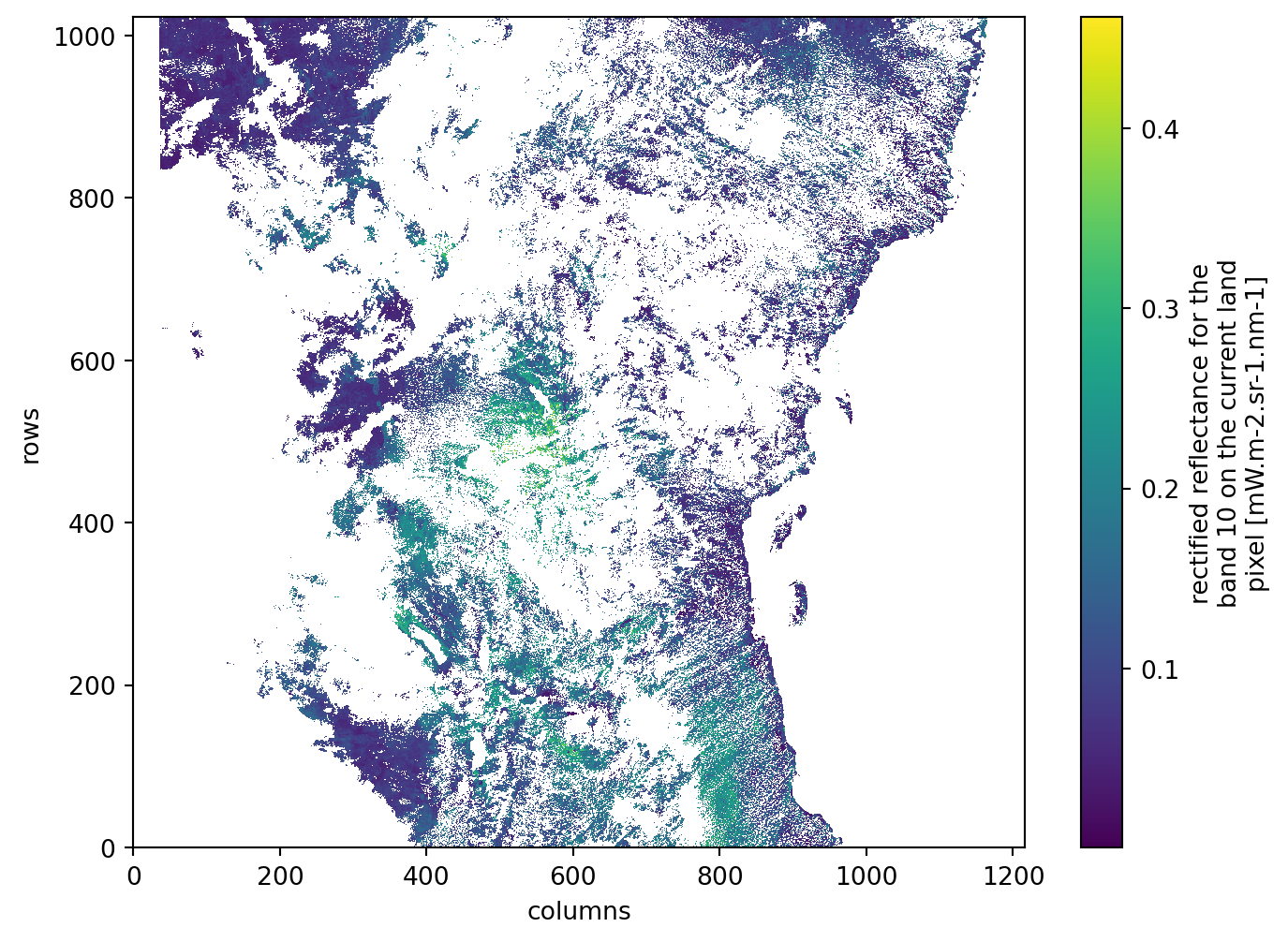
We access a Sentinel-3 OLCI scene from the .zarr archive and inspect its structure and available variables.

s3_url = s3_urls[0]
s3_zarr = xr.open_datatree(s3_url, engine="zarr")

s3_zarr[s3_zarr.groups[0]].groups
('/',
 '/conditions',
 '/measurements',
 '/quality',
 '/conditions/geometry',
 '/conditions/image',
 '/conditions/instrument',
 '/conditions/meteorology')
s3_zarr[s3_zarr.groups[2]].data_vars
Data variables:
    gifapar  (rows, columns) float32 80MB ...
    iwv      (rows, columns) float32 80MB ...
    otci     (rows, columns) float32 80MB ...
    rc681    (rows, columns) float32 80MB ...
    rc865    (rows, columns) float32 80MB ...

As red and near-infrared reflectance bands are used by EFAST, we retrieve them through the measurements group.

band_data_s3 = s3_zarr.measurements.to_dataset()[s3_bands]
band_data_s3
<xarray.Dataset> Size: 557MB
Dimensions:     (rows: 4090, columns: 4865)
Coordinates:
    altitude    (rows, columns) float32 80MB ...
    latitude    (rows, columns) float64 159MB ...
    longitude   (rows, columns) float64 159MB ...
    time_stamp  (rows) datetime64[ns] 33kB ...
Dimensions without coordinates: rows, columns
Data variables:
    rc681       (rows, columns) float32 80MB ...
    rc865       (rows, columns) float32 80MB ...

And to visualize a subset of the retrieved items:

band_data_s3.rc681[::4, ::4].plot(figsize=(8, 6))

Regredding

Define the target regular grid

Sentinel-3 data is provided in a swath geometry and not on a regular grid. Each pixel has its own latitude and longitude. To be able to use the data, we need to resample it onto a regular lat/lon grid over our area of interest. For this, we can make use of the utility geometry.AreaDefinition as part of pyresample library.

The function geometry.AreaDefinition() takes the following arguments:

  • area_id: ID of area
  • description: Description for the grid.
  • proj_id: ID of projection.
  • projection: A PROJ dictionary, PROJ/WKT string, or a CRS object defining the coordinate reference system.
  • width: Number of pixels in the x‑direction (grid columns).
  • height: Number of pixels in the y‑direction (grid rows).
  • area_extent: Spatial bounding box in projection coordinates, given as (lower_left_x, lower_left_y, upper_right_x, upper_right_y).
grid = geometry.AreaDefinition(
    area_id="olci_grid",
    description="OLCI projected grid",
    proj_id="latlon",
    projection="EPSG:4326",
    width=int((search_bbox[2] - search_bbox[0]) / 0.0027),  
    height=int((search_bbox[3] - search_bbox[1]) / 0.0027),  
    area_extent=search_bbox,
)

grid
Area ID: olci_grid
Description: OLCI projected grid
Projection ID: latlon
Projection: {'datum': 'WGS84', 'no_defs': 'None', 'proj': 'longlat', 'type': 'crs'}
Number of columns: 366
Number of rows: 366
Area extent: (33.0, -2.8, 33.99, -1.81)

Resample from swath to grid

We resample the irregular swath data to the regular grid using nearest-neighbor interpolation.

First, we define the swath geometry:

s3_swath = geometry.SwathDefinition(
    lons=band_data_s3["longitude"].values * 1_000_000,
    lats=band_data_s3["latitude"].values * 1_000_000,
)

Then we resample all selected OLCI bands onto the grid using the resample_nearest() function from pyresample library.

The function resample_nearest() performs nearest‑neighbor interpolation using a KD‑tree search and accepts the following arguments:

  • source_geo_def: Geometry of the source swath (e.g., longitudes and latitudes of OLCI pixels).
  • data: Either a 1D array of pixel values or a 2D array with multiple channels stacked along the last dimension.
  • target_geo_def: The target grid onto which data will be resampled (e.g., the AreaDefinition grid).
  • radius_of_influence: Maximum search distance in meters. Only source pixels within this radius are considered.
  • fill_value: Value assigned to pixels with no valid neighbor within the radius. If None, a masked array is returned.
resampled = kd_tree.resample_nearest(
    source_geo_def=s3_swath,
    data=np.stack([band_data_s3[band].values for band in s3_bands], axis=2),
    target_geo_def=grid,
    radius_of_influence=500,
    fill_value=np.nan,
)

Georefrecing

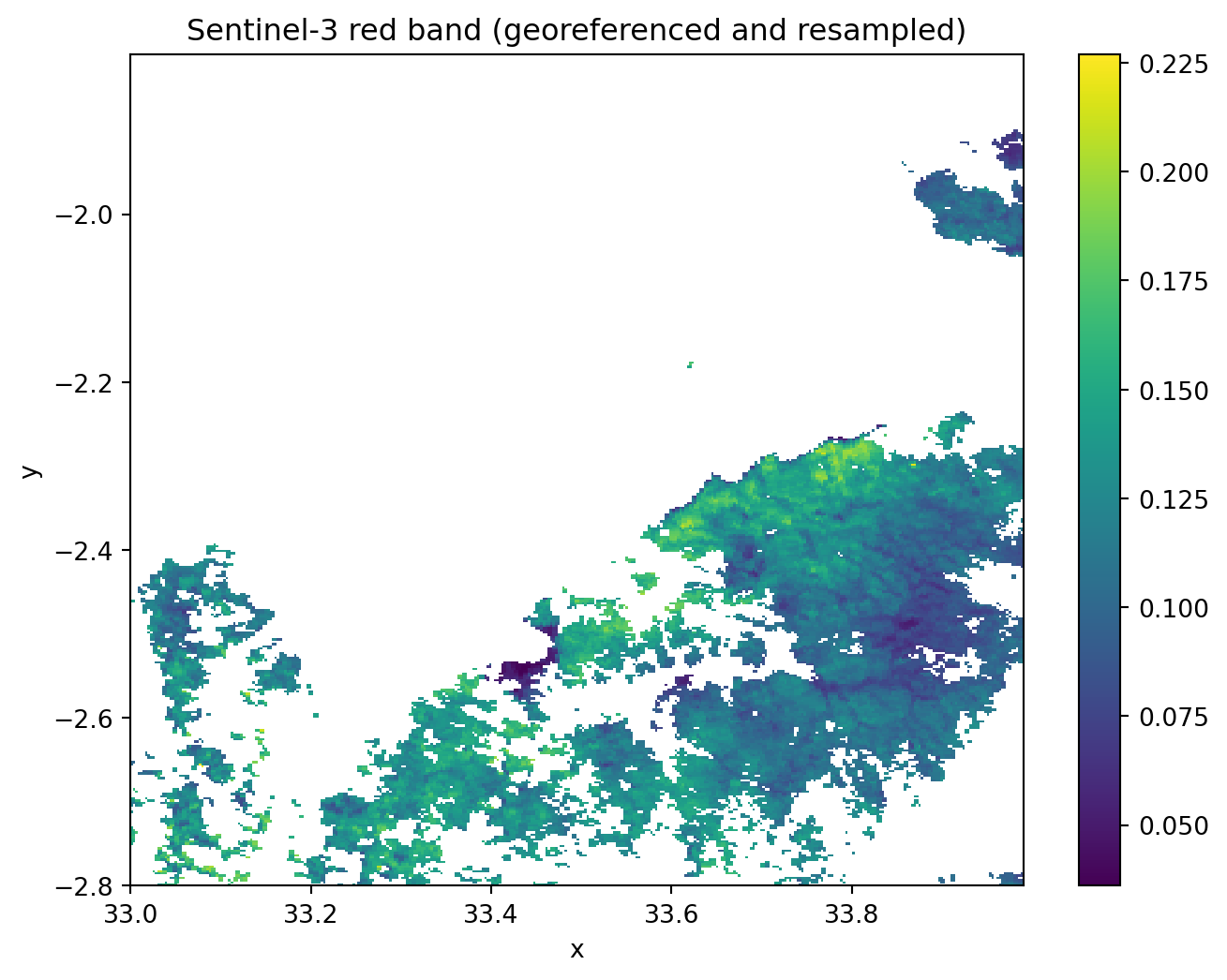
Once we obtain a regular grid, we build a properly georeferenced-xarray object with x/y coordinates and our target CRS (EPSG:4326).

resampled = np.transpose(resampled, (2, 0, 1))

# Build coordinate arrays
x_res = (grid.area_extent[2] - grid.area_extent[0]) / grid.width
y_res = (grid.area_extent[3] - grid.area_extent[1]) / grid.height
x_coords = np.linspace(grid.area_extent[0] + x_res / 2, grid.area_extent[2] - x_res / 2, grid.width)
y_coords = np.linspace(grid.area_extent[3] - y_res / 2, grid.area_extent[1] + y_res / 2, grid.height)

band_data_s3_proj = xr.DataArray(
    resampled,
    dims=("band", "y", "x"),
    coords={"band": s3_bands, "y": y_coords, "x": x_coords},
)

band_data_s3_proj.rio.write_crs("EPSG:4326", inplace=True)
band_data_s3_proj
<xarray.DataArray (band: 2, y: 366, x: 366)> Size: 1MB
array([[[       nan,        nan,        nan, ...,        nan,
                nan,        nan],
        [       nan,        nan,        nan, ...,        nan,
                nan,        nan],
        [       nan,        nan,        nan, ...,        nan,
                nan,        nan],
        ...,
        [       nan,        nan,        nan, ..., 0.08883938,
         0.08471938, 0.08471938],
        [       nan,        nan,        nan, ..., 0.09762871,
         0.09152501, 0.09837642],
        [       nan,        nan,        nan, ..., 0.109241  ,
         0.109241  , 0.1081576 ]],

       [[       nan,        nan,        nan, ...,        nan,
                nan,        nan],
        [       nan,        nan,        nan, ...,        nan,
                nan,        nan],
        [       nan,        nan,        nan, ...,        nan,
                nan,        nan],
        ...,
        [       nan,        nan,        nan, ..., 0.27452925,
         0.26618245, 0.26618245],
        [       nan,        nan,        nan, ..., 0.27752006,
         0.27594838, 0.27286598],
        [       nan,        nan,        nan, ..., 0.26842555,
         0.26842555, 0.26760155]]], shape=(2, 366, 366), dtype=float32)
Coordinates:
  * band         (band) <U5 40B 'rc681' 'rc865'
  * y            (y) float64 3kB -1.811 -1.814 -1.817 ... -2.793 -2.796 -2.799
  * x            (x) float64 3kB 33.0 33.0 33.01 33.01 ... 33.98 33.99 33.99
    spatial_ref  int64 8B 0

To have a quick overview of our results:

band_data_s3_proj.sel(band=s3_bands[0]).plot(figsize=(8, 6))
plt.title("Sentinel-3 red band (georeferenced and resampled)")
plt.show()

Bundle Preprocessing

So far we have walked through each processing of Sentinel-3 OLCI step separately. To automate the workflow and apply it efficiently across Sentinel-3 acquisitions, we could now wrap all these operations into a single processing function called s3_preprocess to prepare the Sentinel-3 scenes for use with EFAST.

For each Sentinel-3 scene, s3_preprocess performs the following steps:

  1. Open the data directly from the cloud-optimized Zarr archive.
  2. Select the red (681 nm) and near-infrared (865 nm) reflectance bands.
  3. Use the per-pixel latitude and longitude to define the original swath geometry.
  4. Define a regular latitude/longitude grid over the area of interest.
  5. Resample the swath data onto this grid using nearest-neighbor interpolation.
  6. Apply the provided scale factors to obtain physical reflectance values.
  7. Build a georeferenced data cube with proper coordinates and CRS.
  8. Save the result as a compressed GeoTIFF file for later use by EFAST.

For details of the code, see zarr_efast_utils.py file. The function s3_preprocess() takes the following arguments:

  • s3_urls: A list of input .Zarr URLs for Sentinel‑3 datasets.
  • bands: A list of Sentinel‑3 spectral band names (e.g., [“rc681”, “rc865”]).
  • search_bbox: Spatial bounding box in projection coordinates, given as (lower_left_x, lower_left_y, upper_right_x, upper_right_y).
  • target_resolution_deg: Target spatial resolution in degrees.
  • output_dir: Directory where the processed GeoTIFF files will be written.
s3_bands = ["rc681", "rc865"]
print(s3_bands, search_bbox, s3_binning_dir)

zarr_efast_utils.s3_preprocess(
    s3_urls=s3_urls,
    bands=s3_bands,
    search_bbox=search_bbox,
    target_resolution_deg=0.0027,
    output_dir=s3_binning_dir,
)
['rc681', 'rc865'] (33.0, -2.8, 33.99, -1.81) /__w/eopf-101/eopf-101/06_eopf_zarr_in_action/test_data/S3/binning
Sentinel-3 preprocessing finished.

Once the Sentinel‑3 scenes have been resampled to the target grid, weighted temporal composites are generated using the produce_median_composite() function. Each composite represents a time‑window summary of several OLCI observations, taking into account temporal distance from the central date as well as proximity to clouds.

The function produce_median_composite() accepts the following arguments:

  • dir_s3: Directory containing the resampled Sentinel‑3 scenes.
  • composite_dir: Directory where the output composite images are written.
  • step: Temporal spacing (in days) between consecutive composites.
  • mosaic_days: Width of the temporal window used to collect images for each composite.
  • s3_bands: List of OLCI bands to include. If None, all available bands are used.
  • D: Distance‑to‑cloud cutoff in pixels; beyond this distance, clouds no longer affect pixel weighting.
  • sigma_doy: Standard deviation controlling the temporal weighting around the central date.
# Define settings
mosaic_days = 60 
step = 10 
s3.produce_median_composite(
    dir_s3=s3_binning_dir,
    composite_dir=s3_composites_dir,
    mosaic_days=mosaic_days,
    step=step,
    s3_bands=None,
)

After creating the composite time series, an optional Gaussian smoothing is applied to reduce noise while preserving the large scale spatial structure.

This is done with smoothing(), which takes:

  • s3_dir: Directory containing the composite images.
  • smoothed_dir: Directory where the smoothed outputs will be stored.
  • product: String used to select which files to smooth (default: "composite").
  • std: Standard deviation of the 2D Gaussian kernel.
  • preserve_nan: Whether invalid pixels (NaN) should remain unchanged during smoothing.
s3.smoothing(
    s3_composites_dir,
    s3_blured_dir,
    std=1,
    preserve_nan=False,
)

The function reformat_s3() is then used to reformat Sentinel-3 images to a format suitable for analysis. and Reformat Sentinel-3 images to a format suitable for analysis. In addition reproject_and_crop_s3() function will create single-band composites of Sentinel-3 data.

s3.reformat_s3(
    s3_blured_dir,
    s3_calibrated_dir,
)
s3.reproject_and_crop_s3(
    s3_calibrated_dir,
    s2_processed_dir,
    s3_reprojected_dir,
)

EFAST Sentinel -2 and Sentinel -3 Fusion

Finally, to generate a synthetic high‑resolution Sentinel‑2–like image on each prediction date, the EFAST fusion algorithm is then applied. The fusion() function combines information from the low‑resolution from Sentinel‑3 composites and the high‑resolution from Sentinel‑2 observations that fall within a defined temporal window. The method uses temporal weighting, similarity scores, and cloud‑distance weighting to produce a fused high‑resolution reflectance product.

The function fusion() takes several argumnets with the ones that will be used are:

  • pred_date: The target date for which the fused high‑resolution image will be produced.
  • lr_dir: Directory containing the low‑resolution (Sentinel‑3) inputs.
  • hr_dir: Directory containing the high‑resolution (Sentinel‑2) preprocessed images.
  • fusion_dir: Output directory for the fused products.
  • product: Keyword used to select the Sentinel‑2 files participating in the fusion.
  • max_days: Maximum temporal distance allowed between the acquisition date and the prediction date.
  • ratio: Conversion factor between high and low‑resolution pixel sizes (S2 vs. S3).
  • minimum_acquisition_importance: Minimum weight threshold for including a high‑resolution acquisition in the fusion.
# Define EFAST settings
maximum_fusion_days = 30
ratio = 30 
# Note: `mosaic_days` and `step` settings are used from the last mosaic operation
# Perform EFAST fusion
for date in rrule.rrule(
    rrule.DAILY,
    dtstart=datetime.strptime(date_start, "%Y-%m-%d") + timedelta(step),
    until=datetime.strptime(date_end, "%Y-%m-%d") - timedelta(step),
    interval=step,
):
    efast.fusion(
        pred_date=date,
        lr_dir=s3_reprojected_dir,
        hr_dir=s2_processed_dir,
        fusion_dir=fusion_dir,
        product="REFL",
        ratio=ratio,
        max_days=maximum_fusion_days,
        minimum_acquisition_importance=0,
    )

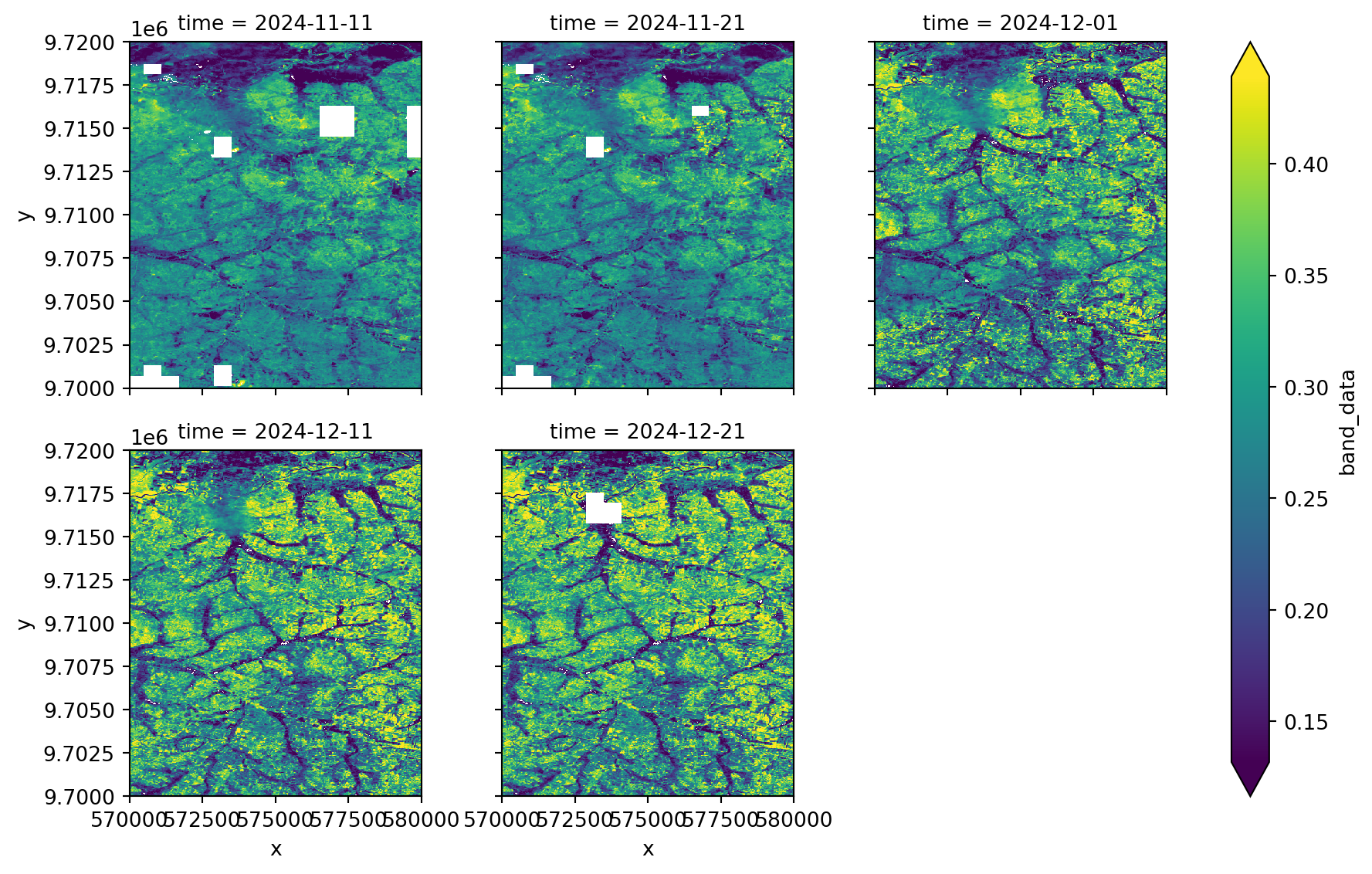
Fusion results

Once the EFAST fusion is complete, we can inspect the results and visualize them as a spatio-temporal time series.

Firstly, we need to collect all fusion result files, extract the acquisition date from the filename, and sort them in chronological order.

# Get all the TIFF files
tif_files = list(fusion_dir.glob("*.tif"))

# Get dates and sort files by date
file_dates = []

for tif_file in tif_files:
    date_str = tif_file.stem.split("_")[1]
    date = datetime.strptime(date_str, "%Y%m%d")
    file_dates.append((date, tif_file))
file_dates.sort(key=lambda x: x[0])

Afterwards, we build a time series data cube over the predefined subset coordinates (xmin, xmax; ymin, ymax).

dates = [d for d, f in file_dates]
files = [f for d, f in file_dates]

# Open the files and stack the data along time dimension
da_list = []

for date, tif in zip(dates, files):  
    da = xr.open_dataarray(tif)
    da_subset = da.sel(band=2).sel(
        x=slice(xmin, xmax), y=slice(ymax, ymin)
    )
    da_subset = da_subset.expand_dims(time=[date])
    da_list.append(da_subset)

stack = xr.concat(da_list, dim="time")
stack
<xarray.DataArray 'band_data' (time: 5, y: 1000, x: 500)> Size: 20MB
array([[[0.21768021, 0.21017014, 0.21016468, ..., 0.10236094,
         0.11230454, 0.12994814],
        [0.21498059, 0.1991341 , 0.19354068, ..., 0.10624737,
         0.11810072, 0.13445408],
        [0.23956679, 0.21283587, 0.20871872, ..., 0.11433379,
         0.13389691, 0.15276006],
        ...,
        [       nan,        nan,        nan, ..., 0.26925751,
         0.2527614 , 0.23746527],
        [       nan,        nan,        nan, ..., 0.26961858,
         0.27172136, 0.2399242 ],
        [       nan,        nan,        nan, ..., 0.25967961,
         0.27838137, 0.25048309]],

       [[0.27321912, 0.2601283 , 0.25925132, ..., 0.11034021,
         0.12016955, 0.13769888],
        [0.26043164, 0.24137504, 0.23437732, ..., 0.11411521,
         0.12584951, 0.14208382],
        [0.27473906, 0.25528132, 0.25099461, ..., 0.12209018,
         0.14152946, 0.16026879],
...
        [0.21579886, 0.24303948, 0.23812551, ..., 0.30551841,
         0.23811872, 0.22158731],
        [0.25301165, 0.26639766, 0.25364123, ..., 0.26550817,
         0.28446832, 0.29588474],
        [0.24378133, 0.2631144 , 0.28084272, ..., 0.22995355,
         0.31831889, 0.35011496]],

       [[0.44554803, 0.44466293, 0.41204194, ..., 0.21664224,
         0.25102936, 0.26620464],
        [0.37261406, 0.35131356, 0.34771921, ..., 0.19171014,
         0.208556  , 0.26086594],
        [0.30260926, 0.36405802, 0.39148564, ..., 0.12076588,
         0.16273121, 0.23233231],
        ...,
        [0.22134383, 0.25201038, 0.24757292, ..., 0.30666062,
         0.24135885, 0.22462123],
        [0.26006137, 0.27418699, 0.26291413, ..., 0.26893517,
         0.28589738, 0.29744265],
        [0.25131287, 0.27064247, 0.28972925, ..., 0.23294762,
         0.315248  , 0.34838121]]], shape=(5, 1000, 500))
Coordinates:
  * time         (time) datetime64[ns] 40B 2024-11-11 2024-11-21 ... 2024-12-21
  * y            (y) float64 8kB 9.72e+06 9.72e+06 9.72e+06 ... 9.7e+06 9.7e+06
  * x            (x) float64 4kB 5.7e+05 5.7e+05 5.7e+05 ... 5.8e+05 5.8e+05
    band         int64 8B 2
    spatial_ref  int64 8B 0
Attributes:
    AREA_OR_POINT:  Area

The generated maps show reflectance in the NIR band. Higher values of it indicate presence of dense green vegetation.

stack.plot.imshow(col="time", col_wrap=3, robust=True)

To visualize the dynamic changes across the time series, we can generate an animated GIF from the fused product.

# Global contrast stretch ---
vmin, vmax = np.nanpercentile(stack.values, (2, 98))

fig, ax = plt.subplots(figsize=(5, 5))
im = ax.imshow(
    stack.isel(time=0).values,
    vmin=vmin,
    vmax=vmax,
)
title = ax.set_title(str(stack.time.values[0])[:10])
ax.axis("off")
plt.colorbar(im, ax=ax, label="Reflectance")

def func(frame):
    im.set_data(stack.isel(time=frame).values)
    title.set_text(str(stack.time.values[frame])[:10])
    return im, title

ani = animation.FuncAnimation(
    fig,
    func,
    frames=stack.sizes["time"],
    interval=400,
    blit=True,
)
plt.close(fig)
ani.save(
    "efast_ts.gif",
    writer="pillow",
    fps=2
)
Image(filename="efast_ts.gif")
<IPython.core.display.Image object>

💪 Now it is your turn

Congratulations 🎉 We have worked through the complete workflow for fusing Sentinel-2 and Sentinel-3 to produce frequent, high-resolution images from .zarr data. Now it is your turn to explore and expand the analysis in the following ways:

Task 1: Explore your own area of interest

Choose a different rangeland anywhere in the world. Use different STAC search configurations (date_start, date_end, search_bbox)

Task 2: Experiment with different EFAST Sentinel-3 preprocessing settings.

  • mosaic_days
  • step
  • ratio

Task 3: Analyze rangeland dynamics using the EFAST fused time series

  • Use the EFAST fused product to analyze vegetation dynamics over rangelands.
  • Compute vegetation indices (e.g. NDVI) from the fused time series.
  • Explore seasonal patterns, trends, or anomalies in rangeland condition using the fused high-resolution time series.

Conclusion

In this notebook, we demonstrated how to use Sentinel-2 and Sentinel-3 data in .zarr format together with EFAST to generate frequent, high-resolution time series over rangeland areas. The Zarr data format enables efficient access to large satellite archives without loading entire datasets into memory.

We developed a complete processing workflow using pystac-client and the EOPF STAC API to discover and access the data, followed by sensor-specific preprocessing steps. For Sentinel-2, this included band selection and cloud masking. For Sentinel-3, this included resampling the swath data onto a regular grid. The preprocessed datasets were then fused using EFAST to produce a consistent, analysis-ready time series with both high spatial and temporal resolution.

Finally, we showed how to inspect and visualize the fused results as a spatio-temporal data cube and how to explore temporal dynamics over rangelands using time series plots and animations.


What’s next?

This resource is constantly updated! Stay Tuned for new chapters 🛰️ !